A0: Applied Exercise
Taking & Exporting Photos
Please read these notes before collecting photographs.
The aim is to collect a compact set of useful visual evidence while preserving the original image files and available camera metadata.
1. Before You Start
Before collecting photographs:
- Use the normal high-resolution setting of your device, for example approximately 4032 × 3024 pixels or higher.
- Avoid fisheye modes and, where possible, extreme wide-angle settings that introduce substantial geometric distortion.
- Do not deliberately reduce image resolution or quality.
2. Take Purposeful Photographs
Photographs should be purposeful rather than repetitive.
Aim for a compact set of images that collectively describe the artefact and provide useful variation in viewpoint and scale.
System Photographs
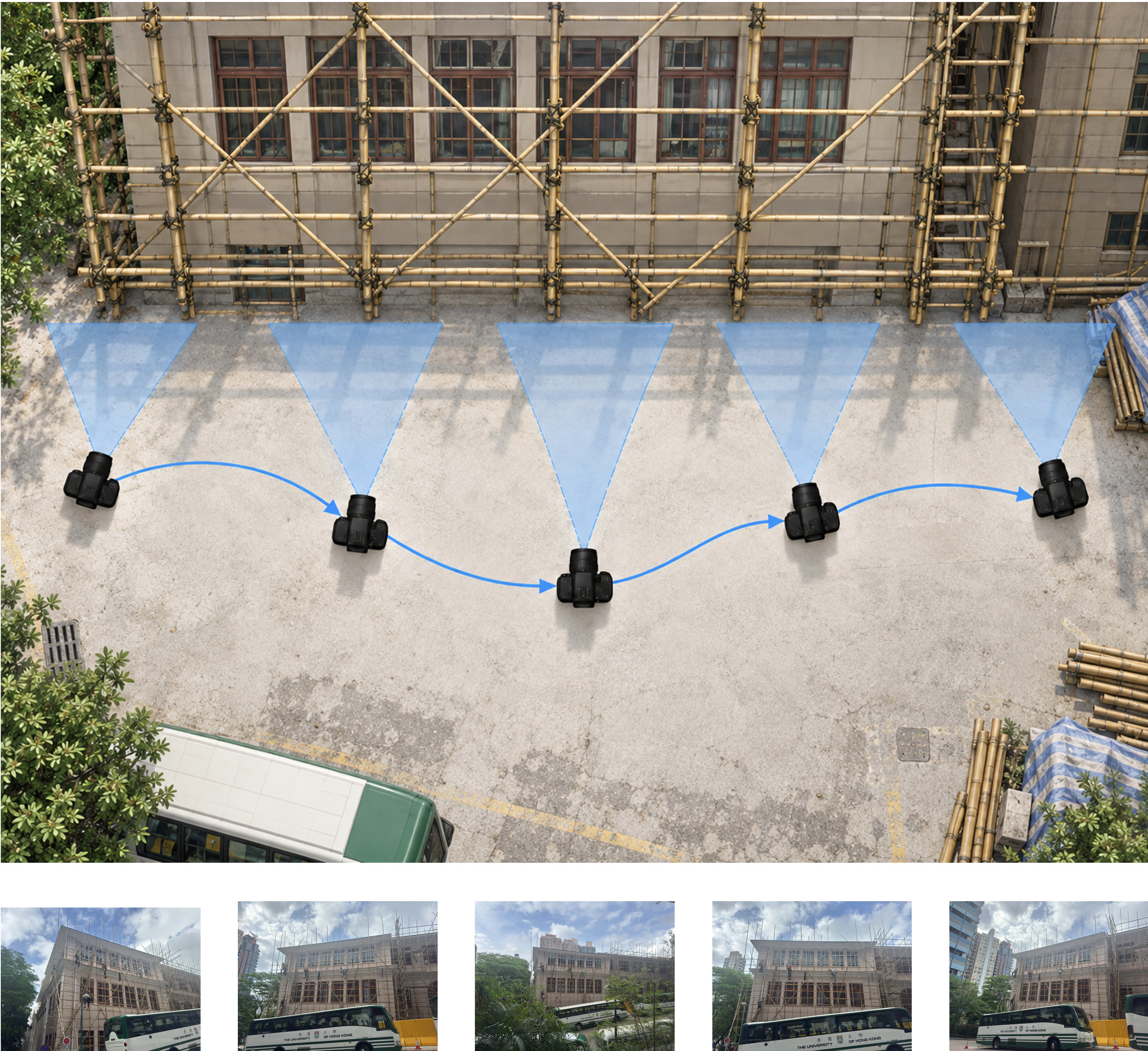
For each collection, take approximately 3–5 useful System photographs, where photography is relevant.
For systems with an important three-dimensional configuration, photograph the System from sufficiently different positions so that its overall form can be understood.
When taking System photographs:
-
Move between viewpoints.
Move a sufficient distance between photographs so that the System is genuinely seen from different positions. -
Capture the complete System.
The scaffold, building, room, truss, frame, or other target System should appear as completely as reasonably possible across the set of photographs. -
Avoid unnecessary distortion.
Avoid fisheye modes and, where possible, very wide-angle settings. -
Use high-resolution images.
Use the normal high-resolution setting of your device. -
Keep conditions reasonably consistent.
Where possible, minimise major changes in lighting and exposure between viewpoints. -
Keep Location Services enabled.
This allows available location information to remain associated with the photograph.
Detail Photographs
For each collection, take approximately 4–5 purposeful Detail photographs or representations, where relevant.
These might include:
- Joints and connections.
- Individual members.
- Material interfaces.
- Façade components and openings.
- Furniture or objects.
- Local spatial conditions.
- Other features that caught your attention.
Avoid collecting many nearly identical close-ups.
Most importantly, try to make each Detail refer back to a recognisable location within the System.
3. Preserve the Original Files
Keep the original image file produced by your device.
Your device may produce .HEIC, .JPG, .DNG, or another format. Keep that original format rather than converting the image simply for submission.
You may rename the file where necessary, but do not re-save or re-export the photograph simply to rename it.
Edited images, crops, annotations, and other derived material can be created later, but should never overwrite the original.
Original evidence first → derived material later
4. Export Camera / EXIF Information
For your System photographs, export the available camera / EXIF information.
For Detail photographs, EXIF export is optional.
EXIF files are not required for Context photographs or for plans, scans, drawings, screenshots, renderings, or other non-camera material.
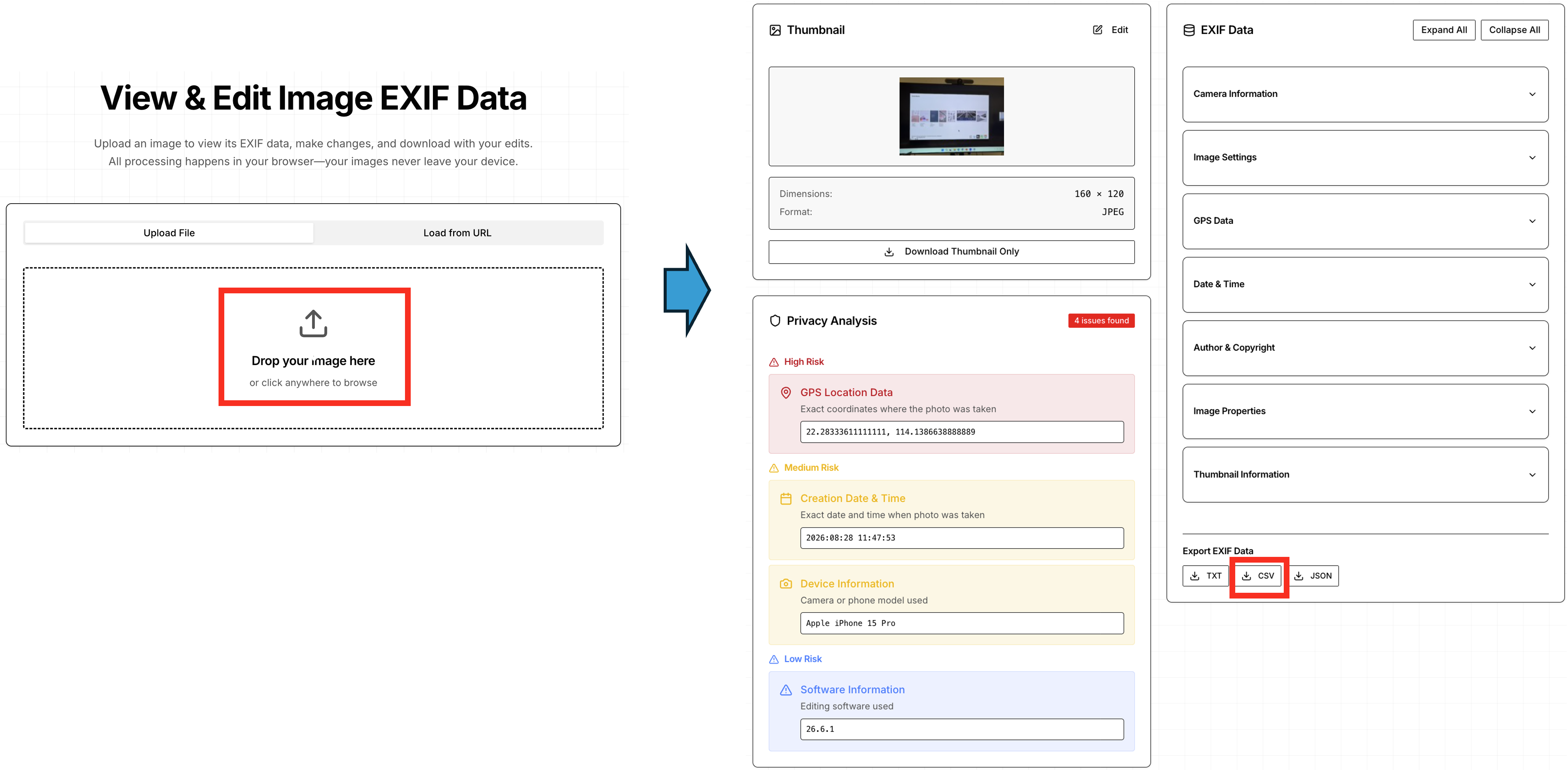
Export EXIF Data
For each applicable photograph:
- Open [EXIF Data].
- Upload the original photograph.
- Export the available metadata as a CSV file.
- Save the CSV together with the corresponding photograph.
For example:
C01_System_01.HEIC
C01_System_01_EXIF.csv
The exported information may include:
- Device information.
- Image dimensions.
- Capture settings.
- Date and time.
- GPS / location information, where available.
Not every image will contain every type of metadata.
Do not add or invent missing information.
5. Before You Finish
Check that:
- Your 3–5 System views show genuinely different viewpoints where appropriate.
- The overall System can be understood across the set of photographs.
- Your 4–5 Detail views show purposeful rather than repetitive conditions.
- Important Details can be related back to the wider System.
- Original image files have been preserved.
- EXIF CSV files have been exported for the System photographs.
- Location information has been preserved where available.
For file naming and submission requirements, see [Artefacts Checklist].